Download & Try Free

Apps for Financial Management & Member Directories

Three purpose-built applications for churches, NGOs, and associations — each downloadable free with built-in sample data. Pay only when you decide to use it for real.

Secure Ledger Family Directory Quick Reference Pricing & Purchase

Try before you buy. Download any app and explore every feature using the built-in sample data — no payment, no registration required. A license key is only needed when you switch to your organisation's actual data. View pricing →

App 1 of 3
Secure Ledger app logo

Secure Ledger

A complete offline accounting system built on double-entry bookkeeping principles — designed specifically for organisations that need professional financial records without cloud dependency.

  • Flexible accounting periods — set to any month, quarter, half-year, or full financial year for seamless year-on-year transitions
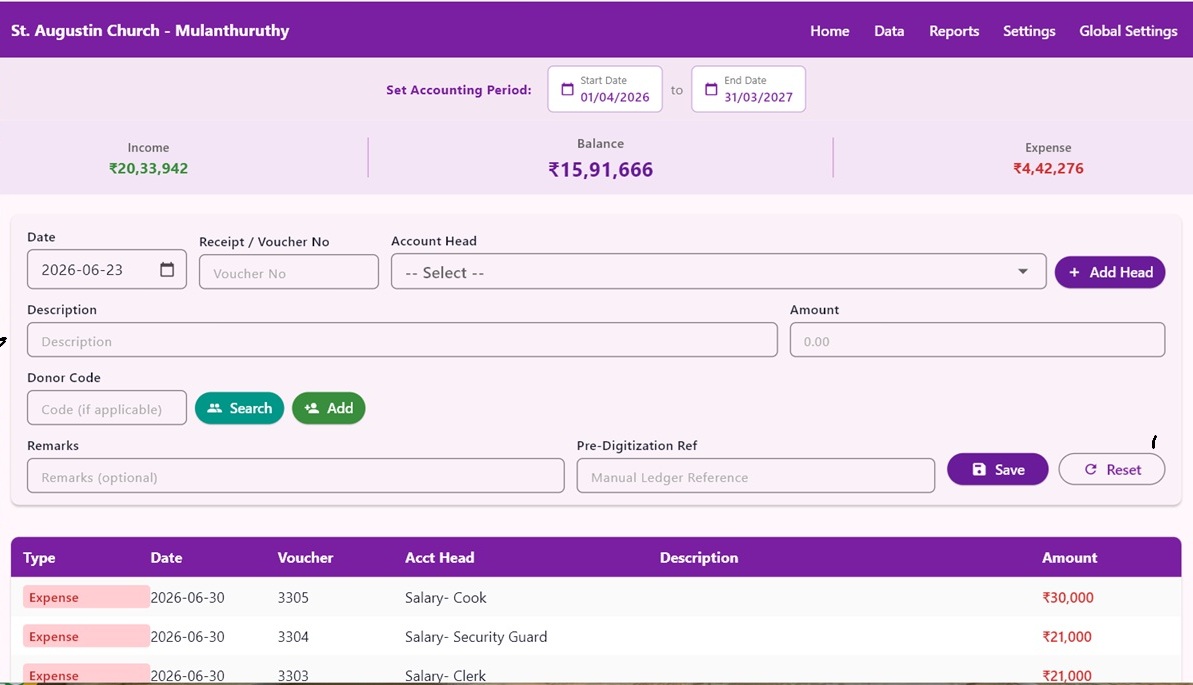
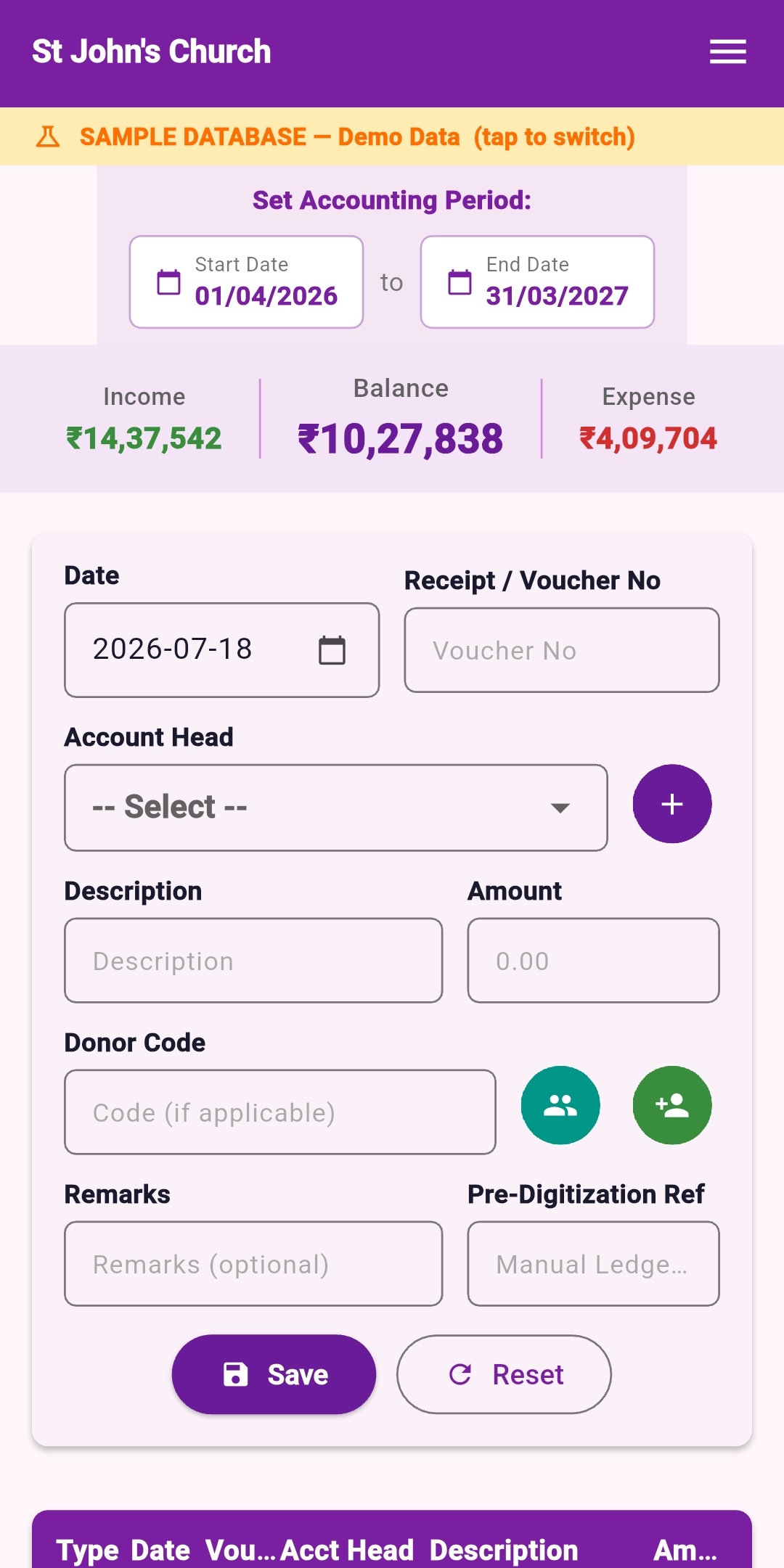
  • Dashboard showing total income, expenses, and running balance at a glance
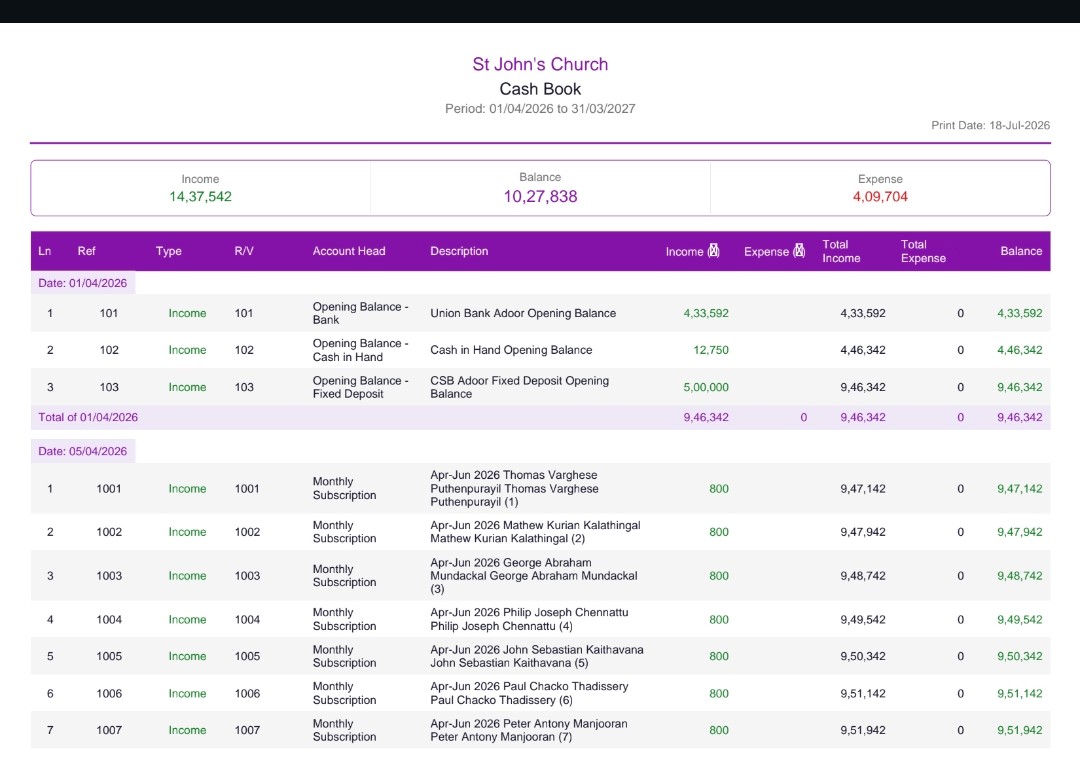
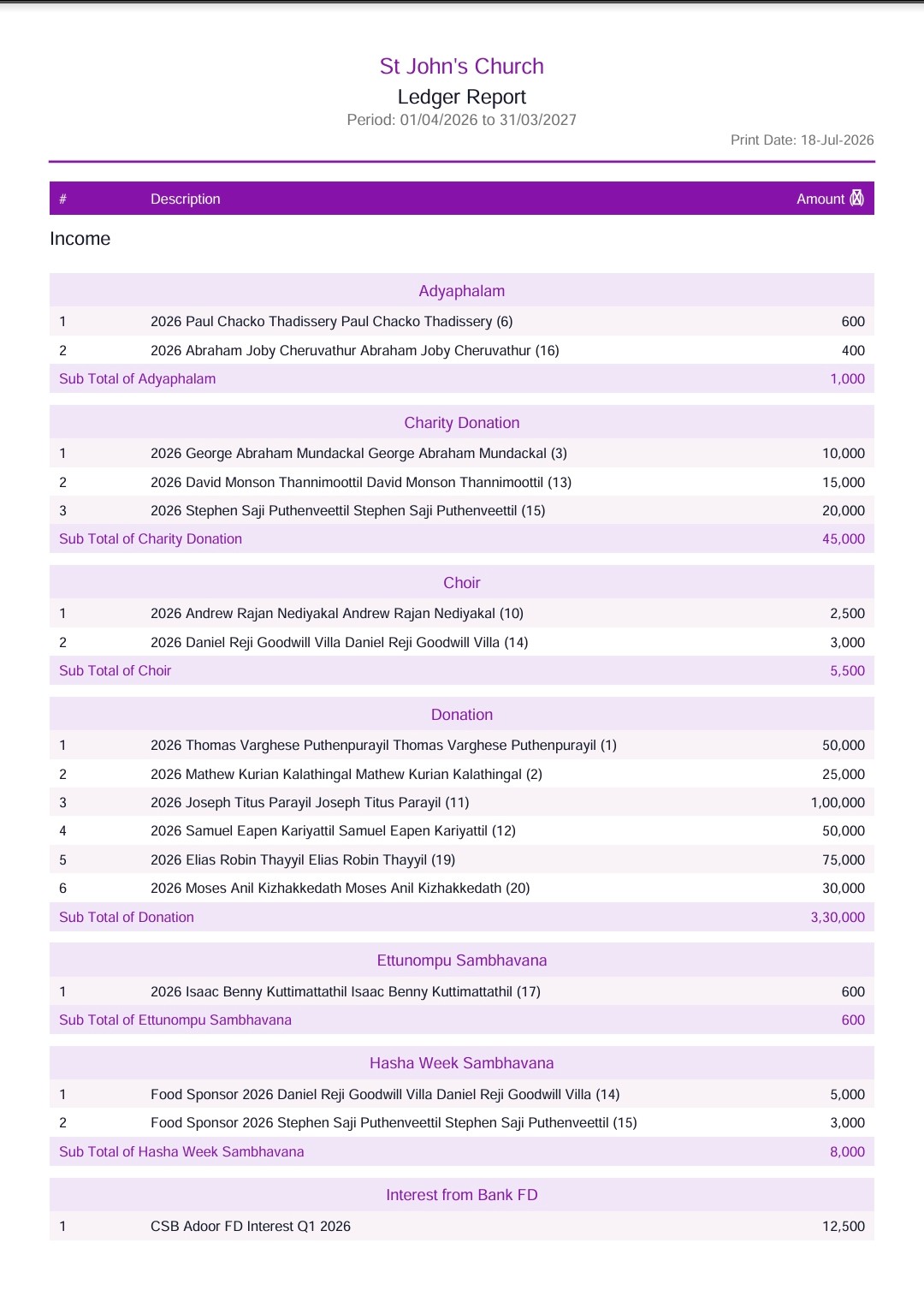
  • Professional reports: Daily Cash Book, Ledger, Summary of Accounts, Member Statement, Regional Statement
  • Excel import/export for periodic backup and easy data restoration when switching devices
  • Strictly follows best practices of double-entry bookkeeping — satisfies external auditors and general body meetings
  • 100% offline — your financial data never leaves your device
Who is this for?

Churches, temples, NGOs, YMCA chapters, resident associations, clubs — any organisation that maintains accounts and needs audit-ready reports without ongoing subscription costs.

Professional Reports

Generated directly from the app — on your phone or PC

Sample reports below use the app's built-in fictitious data. The organisation and all people named are entirely fictitious.

Data Backup

Excel Export / Import — never lose your data

  • Export All Tables to Excel
    Export every table — accounts, transactions, members, settings — to a structured Excel workbook for safe storage on your PC, Google Drive, or USB drive.
  • Reset All Data
    Clears all actual data and returns the app to a clean state — useful when switching organisations or doing a fresh setup. Always export a backup first.
  • Import from Excel
    Restore all data from a previously exported backup. Reinstall the app, switch to a new phone or PC, and have all records back within minutes.

Download & Install Secure Ledger

Windows PC
Runs directly from the folder — no installation needed.
Download ZIP
  1. Extract the ZIP to a folder, e.g. D:\SecureLedger\
  2. Double-click secure_ledger_suite.exe to run
  3. Right-click → Send to → Desktop (shortcut)
Android Tab / Phone
APK file — install directly on your Android device.
Download APK
  1. Download the APK file to your device
  2. Settings → Security → Enable "Install from Unknown Sources"
  3. Open the APK file and tap Install
Secure Ledger dashboard — laptop view
Dashboard — Laptop
Secure Ledger dashboard — mobile view
Dashboard — Mobile
Secure Ledger Cash Book report
Cash Book Report
Secure Ledger Ledger report
Ledger Report
App 2 of 3
Family Directory app logo

Family Directory

A standalone member directory management app — maintains family and contact records, and generates professionally formatted PDF and searchable HTML directories.

  • Records contact information and date of birth (day & month) for all family members
  • Generate a fully formatted, print-ready PDF member directory in one click
  • Export as searchable HTML — paste directly into your organisation's website for an instant online directory
  • Photos embedded in exports — directories include member photos where provided
  • User-friendly data entry designed for non-technical users
  • Kept separate from accounting — directory staff never see financial records
Who is this for?

Churches, temples, clubs, and associations that maintain a member register and want to produce a printed directory or an online searchable member list — without technical effort.

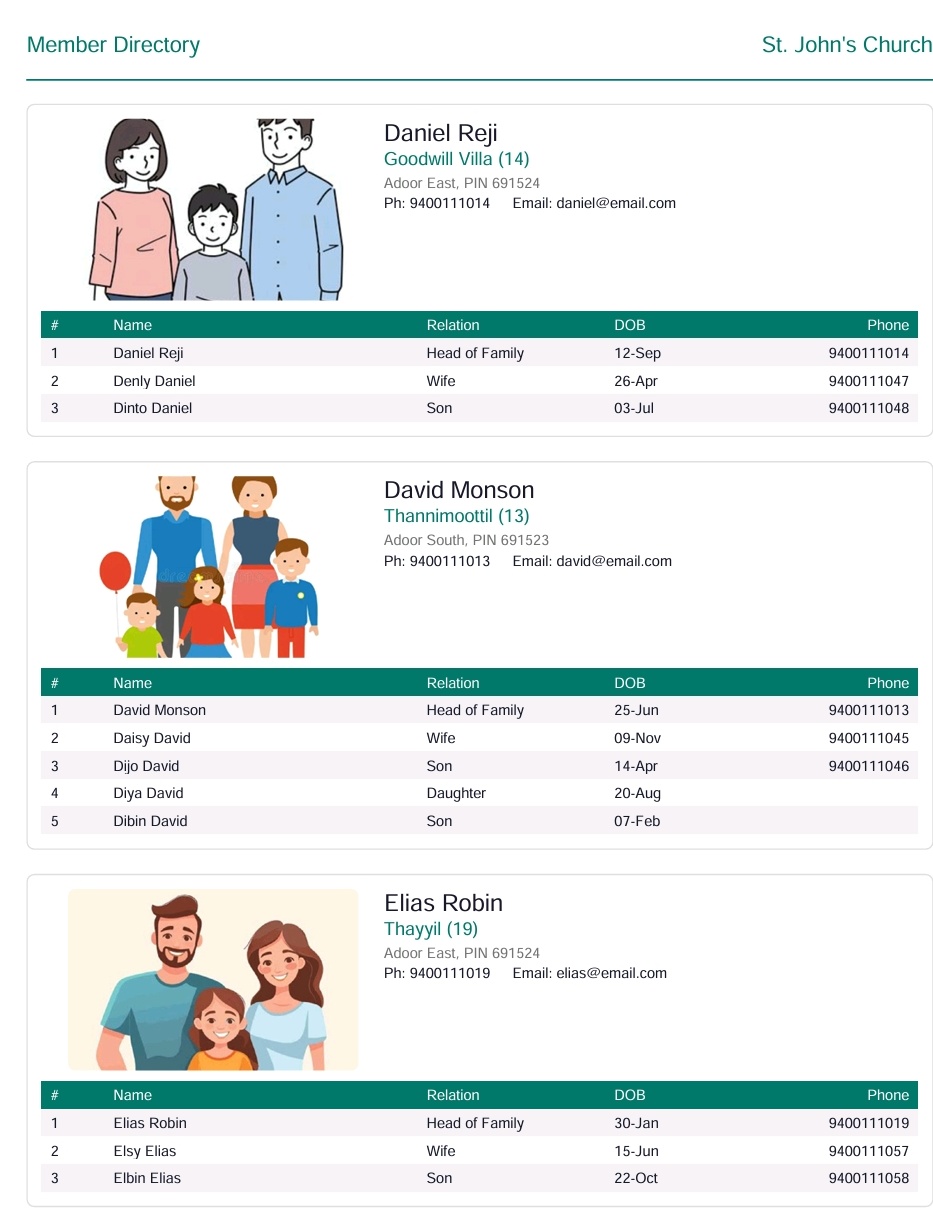
Sample Directory

See what the app generates in one click

Generated from the app's built-in sample database. The organisation and all people named are entirely fictitious.

Download & Install Family Directory

Windows PC
Runs directly from the folder — no installation needed.
Download ZIP
  1. Extract the ZIP to a folder, e.g. D:\FamilyDirectory\
  2. Double-click the .exe file to run
  3. Right-click → Send to → Desktop (shortcut)
Android Tab / Phone
APK file — install directly on your Android device.
Download APK
  1. Download the APK file to your device
  2. Settings → Security → Enable "Install from Unknown Sources"
  3. Open the APK file and tap Install
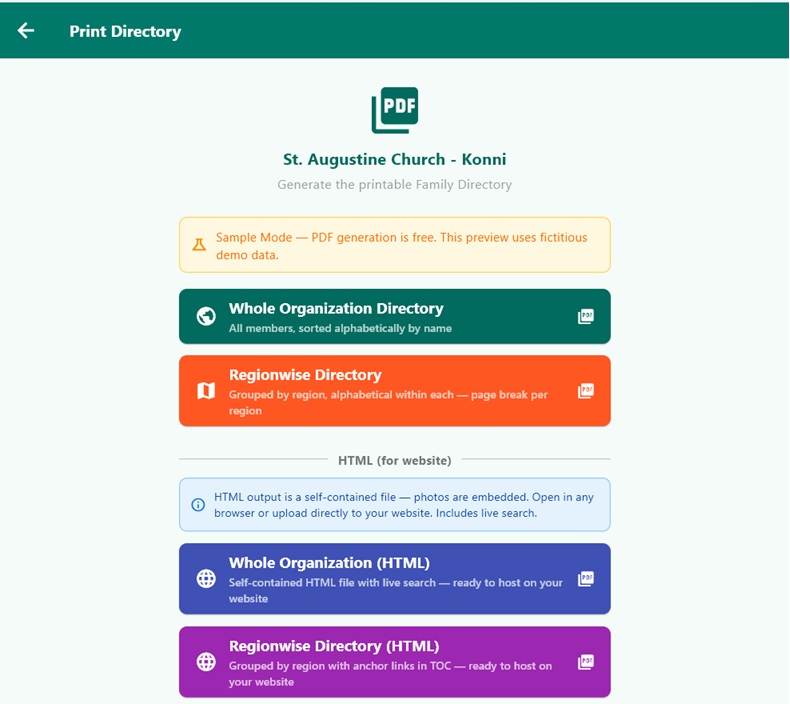
Family Directory — Print Hub screen
Family Directory — Print Hub
Sample Family Directory PDF output
Sample Family Directory
App 3 of 3
Quick Reference app logo

Quick Reference

A Personal Knowledge Management tool for public speakers, writers, and researchers — save links from YouTube and news sites while browsing, tag them by category, and retrieve them instantly when you need them.

  • Save URLs from any website or YouTube video with a single action while browsing
  • Categorise saved links under custom topics for easy retrieval later
  • Instant search across all saved references — find what you need in seconds
  • Replaces scattered Google Sheets or browser bookmarks with one organised tool
Who is this for?

Public speakers, bloggers, pastors, and researchers who routinely collect online references for speeches, sermons, or articles and need a reliable way to find them later.

Absolutely Free

A gift for my well-wishers & Play Store testers

Quick Reference is offered completely free of charge — no license key, no payment, ever. It is my way of saying thank you to everyone who has supported this journey and to those who have generously stepped up as early Play Store testers. Download it, use it, and enjoy it with my compliments.

Download & Install Quick Reference

Windows PC
Runs directly from the folder — no installation needed.
Download ZIP
  1. Extract the ZIP to a folder, e.g. D:\QuickReference\
  2. Double-click the .exe file to run
  3. Right-click → Send to → Desktop (shortcut)
Android Tab / Phone
APK file — install directly on your Android device.
Download APK
  1. Download the APK file to your device
  2. Settings → Security → Enable "Install from Unknown Sources"
  3. Open the APK file and tap Install
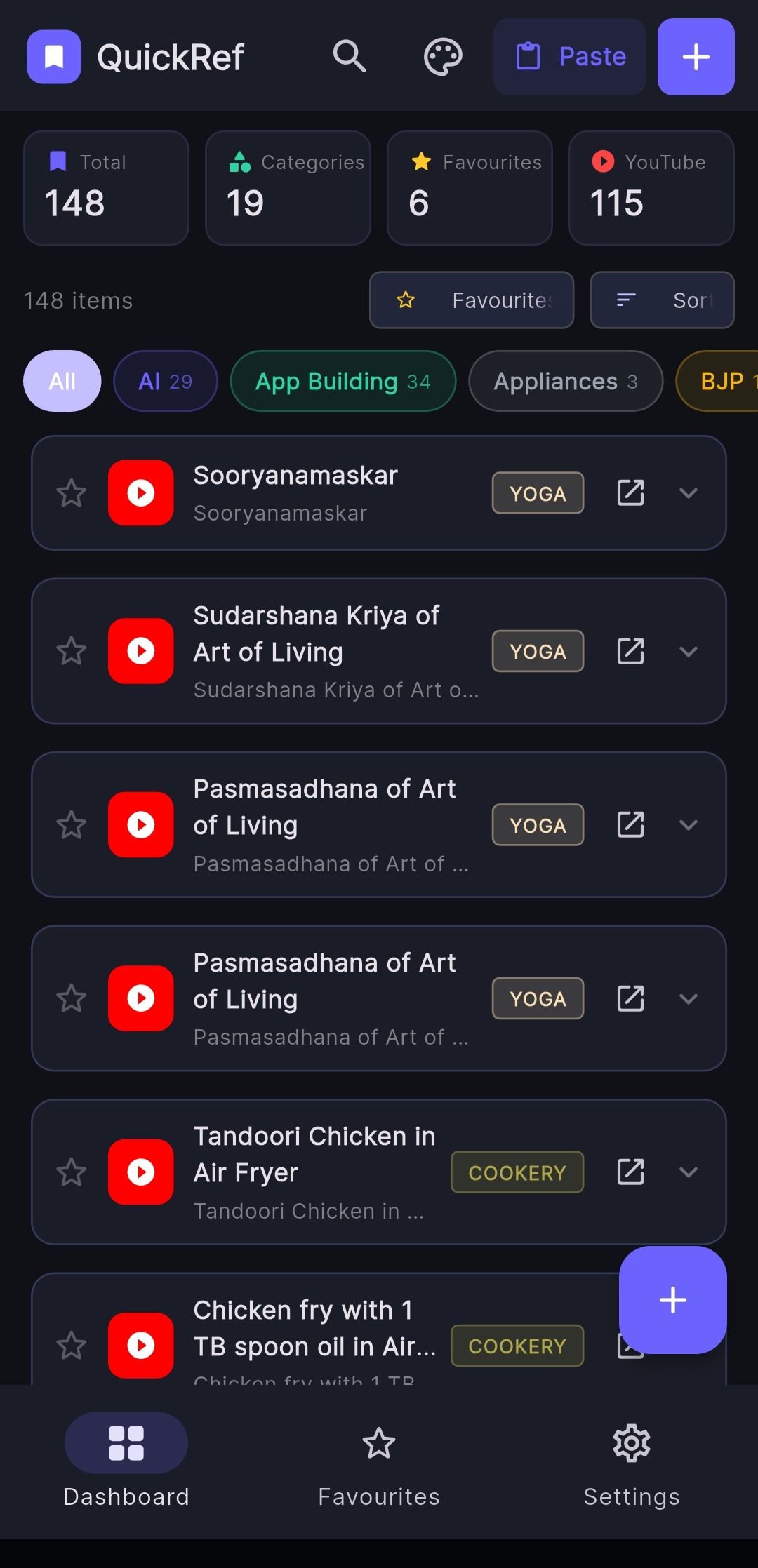
Quick Reference — Dashboard view
Quick Reference — Dashboard
What Users Say

Trusted by Organisations Across Kerala

Here is what some of our users have to say. More testimonials will be added as the app family grows.

"

ഞാൻ അടൂർ സേക്രഡ് ഹാർട്ട് പള്ളിയുടെ വികാരി ആയിരുന്ന കാലത്തു 2015 ജൂണിൽ ആയിരുന്നു പള്ളിയുടെ ഡിജിറ്റയ്സേഷന്റെ ഭാഗമായി അക്കൗണ്ടിങ് സോഫ്റ്റ്‌വെയറും വെബ്സൈറ്റും കുടുംബാംഗങ്ങളുടെ വിവരങ്ങൾ ഉൾപ്പടെ ചേർത്തുകൊണ്ടുള്ള ഓൺലൈൻ ഡയറക്ടറിയും ശ്രീ. മാത്യൂസ് ജേക്കബ് നിർമ്മിച്ചത്. ഡിജിറ്റയ്സേഷൻ പള്ളിയുടെ പുരോഗതിക്ക് വലിയ സംഭാവന നൽകി. പുതിയ ദേവാലയ നിർമ്മാണ സമയത്തു കണക്കുകൾ സുതാര്യമായി കൈകാര്യം ചെയ്യുവാൻ അക്കൗണ്ടിംഗ് സോഫ്റ്റ്‌വെയർ വളരെയേറെ പ്രയോജനപ്പെട്ടു. കാലാനുസൃതമായി സോഫ്റ്റ്‌വെയർ പരിഷ്കരിക്കുന്നത് തുടരുന്നുവെന്ന് അറിയുന്നതിൽ സന്തോഷം. എല്ലാ നന്മകളും നേരുന്നു.

Digitization
Geevarghese Nediyath Remban
ഗീവർഗീസ് നെടിയത്ത് റമ്പാൻ
മുൻ വികാരി
തിരുഹൃദയപ്പള്ളി അടൂർ
+91 94470 41643
"

അടൂർ തിരുഹൃദയ മലങ്കര കത്തോലിക്കാ പള്ളിയുടെ 2025 ഏപ്രിൽ മുതൽ 2027 മാർച്ച് വരെയുള്ള ട്രസ്റ്റിയായി എന്നെ പൊതുയോഗം തിരഞ്ഞെടുത്തു കഴിഞ്ഞപ്പോൾ സാമ്പത്തിക കാര്യങ്ങൾ കൈകാര്യം ചെയ്യുന്നതിന് പള്ളിയുടെ അക്കൗണ്ടിംഗ് സോഫ്റ്റ്‌വെയർ വളരെയേറെ സഹായിച്ചു. ശ്രീ മാത്യൂസ് ജേക്കബ് നിർമ്മിച്ച അക്കൗണ്ടിംഗ് സോഫ്റ്റ്‌വെയർ കൃത്യമായ രീതിയിൽ വാർഷിക കണക്കുകൾ കൈകാര്യം ചെയ്യുന്നതിന് സഹായകരമാണ്. കണക്കുകൾ പ്രിന്റ് ചെയ്ത് സൂക്ഷിക്കുന്നതിനും കൃത്യമായി ഓഡിറ്റ് ചെയ്യുന്നതിനും ഒക്കെ ഈ അക്കൗണ്ടിംഗ് സോഫ്റ്റ്‌വെയർ എന്നെ വളരെ ഏറെ സഹായിച്ചു.

Secure Ledger
Binu Vattavelil
ബിനു വട്ടവേലിൽ
ട്രസ്റ്റി
തിരുഹൃദയപ്പള്ളി അടൂർ
+91 94473 59113
"

2018-19, 2019-20, 2020-21, 2022-23, 2024-25 സാമ്പത്തിക വർഷങ്ങളിൽ ഞാൻ പള്ളിയുടെ കണക്ക് കൈകാര്യം ചെയ്തത് ശ്രീ. മാത്യൂസ് ഡെവലപ്പ് ചെയ്ത സോഫ്ട്‍വെയർ ഉപയോഗിച്ചാണ്. ഏക്സ്റ്റേണൽ ഓഡിറ്റേഴ്‌സിനും അതിരൂപതാ ഫിനാൻസ് ഓഫീസർക്കും വേണ്ട രീതിയിലുള്ള കണക്കുകൾ ഈ സോഫ്ട്‍വെയറിൽക്കൂടി വേഗത്തിൽ പ്രിന്റ് ചെയ്ത് എടുക്കുവാൻ സാധിക്കുന്നതുപോലെ പഴയ കൈയ്യെഴുത്ത് രീതിയിൽക്കൂടി ഒരിക്കലും സാധ്യമല്ലായെന്നും തുടർന്നും ഈ സിസ്റ്റം ഉപയോഗിക്കുകയല്ലാതെ ഒരു തിരിച്ചു പോക്കിനുള്ള യാതൊരു സാധ്യതയുമില്ലായെന്നും മാറി മാറി വരുന്ന ട്രസ്റ്റികൾ ഇതു തന്നെ ഉപയോഗിക്കാൻ തയ്യാറാകുന്നതിൽ നിന്നും വ്യക്തമാണ്. കാലാനുസൃത മാറ്റങ്ങൾ വരുത്തി നിരന്തരം സിസ്റ്റം അപ്ഡേറ്റ് ചെയ്തുകൊണ്ടിരിക്കാൻ മാത്യൂസ് ശ്രമിക്കുന്നത് അഭിനന്ദനാർഹമാണ്. അഭിനന്ദനങ്ങൾ 🎈 ആശംസകൾ 🎉

Secure Ledger
SHM Joseph
SHM Joseph
മുൻ ട്രസ്റ്റി
തിരുഹൃദയപ്പള്ളി അടൂർ
+91 94473 24965

Ready to activate?

Impressed with the app? Get a license key.

Secure Ledger starts at ₹5,000. Family Directory at ₹7,000. Buy both together for ₹10,000 and save ₹2,000.

View Pricing & Purchase